Descrição
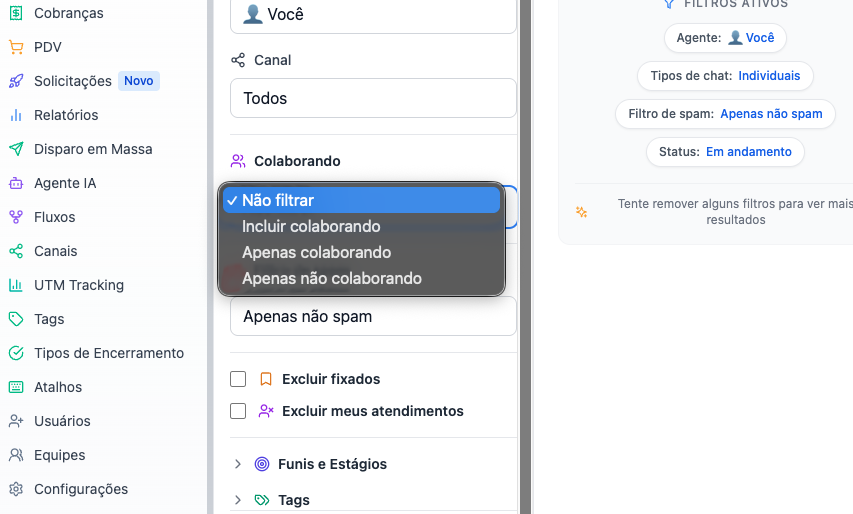
A new filter option is needed in the conversations menu that adds conversations the user is collaborating on without removing other already filtered conversations. Today the filter limits the view to "only collaborating" or "only not collaborating", which restricts viewing flexibility. This new filter will make it possible to combine different criteria without limiting only to conversations where you collaborate. Users will see all conversations according to other applied filters and also include those where they participate as a collaborator. The result is a broader, more practical view, making it easier to follow multiple support sessions.
How to use
New: "Include collaborating" filter
Before, when filtering conversations by collaboration, you could only see only those you were collaborating on or only those you were not — which limited the view a lot.
Now there is "Include collaborating", which works differently: it keeps everything you already filtered (team, status, agent, etc.) and also includes conversations where you participate as a collaborator.
Practical example: on the Team tab, you still see the team's sessions and, at the same time, conversations where you are helping — without switching tabs all the time.
How to use:
- Open Support
- Click Filters
- Under Collaborating, choose Include collaborating
- Adjust other filters normally
The same option is available in quick filter settings for those who customize conversation menu tabs.
More details: Changelog v2026.6.6
Progresso
100%Interflow · 12 de junho de 2026