Descrição
A feature is needed to restrict which channels (such as WhatsApp, Instagram, and others) are visible when sending messages to new customers, according to the user type. The goal is to make sure only authorized users can see and select certain channels, making the process safer and more controlled for the company.
In practice, when starting a new conversation with a customer and opening the list of available channels, the platform should show only the channels allowed for that specific user type. Restricted channels should be hidden automatically so unauthorized people cannot use them.
With this change, the company has more control over who can use each service channel, reducing risk and organizing the communication flow better.
How to use
Channel restriction when starting a conversation
Now, when you start a new conversation with a customer, the channel list (WhatsApp, Instagram, and others) shows only the channels allowed for the user's profile. Restricted channels stay hidden; auxiliary channels are also excluded from this list.
How to configure it
- Go to Channels and open the channel you want
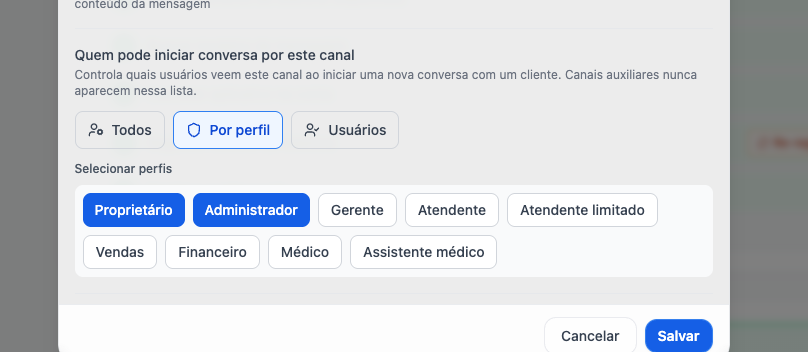
- In Settings, use Who can start a conversation on this channel
- Choose:
- Everyone — any member (default)
- By profile — for example, only managers or sales
- Users — specific people
- Save
Owners and administrators still see every primary channel.
How it works day to day
When you click to start a conversation from a contact, the platform lists only channels that are active, compatible with the contact type, and authorized for that user. Without permission, creating the conversation is also blocked on the server.
Documentation
- Changelog: v2026.7.5
- Guide: Channel restriction when starting a conversation
Progresso
100%Trevisol & Silva Advocacia · 26 de junho de 2026