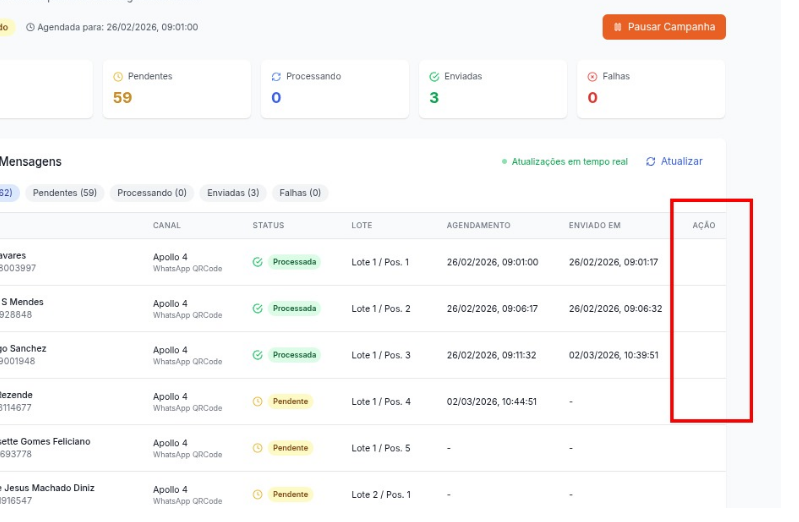
Descrição
Quick access to the conversation via the icon in the bulk send actions tab stopped working, even after refreshing the page. This issue needs to be fixed so users can open the conversation directly from the shortcut. The goal is practical bulk send management and less time spent on manual navigation.
After the fix, clicking the icon opens the conversation normally, keeping a practical flow for agents. The feature should work steadily without extra page reloads.
The expected result is more agility in support routines, with a smooth, intuitive experience when opening conversations from the bulk send list.
How to use
What was happening
The actions column shortcut relied on a concrete message in the conversation (as with normal text sends). In campaigns in flow mode, the system starts or continues a flow in the chat; in that case there is no single message in the queue to anchor the link, so the icon could not open the conversation the same way — and refreshing the page did not fix it, because the required data was not saved in the queue.
What we did
We now record the chat (chat_id) on each bulk send queue item, including flow mode and normal send, and adjusted the screen to use that chat for the shortcut (with real-time updates, without reload). When there is no chat yet, the shortcut can go to the customer's support area. We also added usability improvements (open in new tab with Cmd/Ctrl and different icons for "chat" and "customer conversation list").
Result
Quick conversation access is practical and stable again in bulk sends, including when the campaign is tied to a flow, without depending on reloading the page for the link to work.
Progresso
100%Apollo Digital | Jorge · 01 de abril de 2026