Descrição
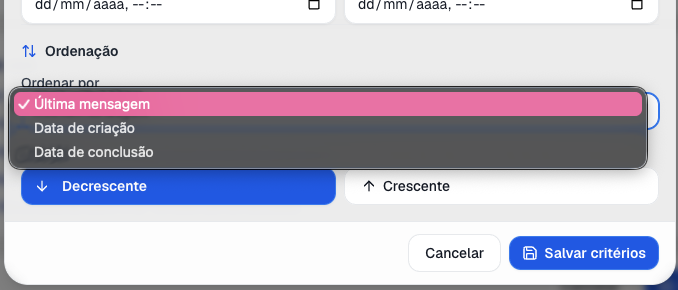
Fix the issue with quick conversation filters on the /app/chats page on desktop at 1568px width. When editing a filter's criteria, the sort option always appears as "Last message" and prevents selecting "Creation date" and "Completion date" correctly. Because this behavior is documented, the system must allow full use of all three options.
In practice, users should open a quick filter, edit its criteria, and access the sort field. When choosing "Last message", "Creation date", or "Completion date", the selected option must stay selected without automatically reverting to "Last message". After saving the filter, the system must keep the choice. For example, if someone selects "Creation date" and saves, when editing the filter again that option should still be selected and applied to the conversation list.
With the fix, users can freely choose how to sort conversations and save that preference in the quick filter. They can organize support by the most recent message, creation date, or completion date as the team needs, making conversation lookup and follow-up more predictable and efficient.
How to use
Quick filters now save sort order
When editing a quick filter, the Sort by option (last message, creation date, or closing date) and direction (newest or oldest) are saved along with the other criteria.
After saving, when you click that filter in the conversation list, chats appear in the chosen order.
Progresso
100%Interflow · 09 de outubro de 2026