Descrição
Implement an internal chat inside Interflow to ease communication between company staff, without mixing customer conversations with internal interactions. This helps quick exchanges of information, notices, and alignment directly on the platform.
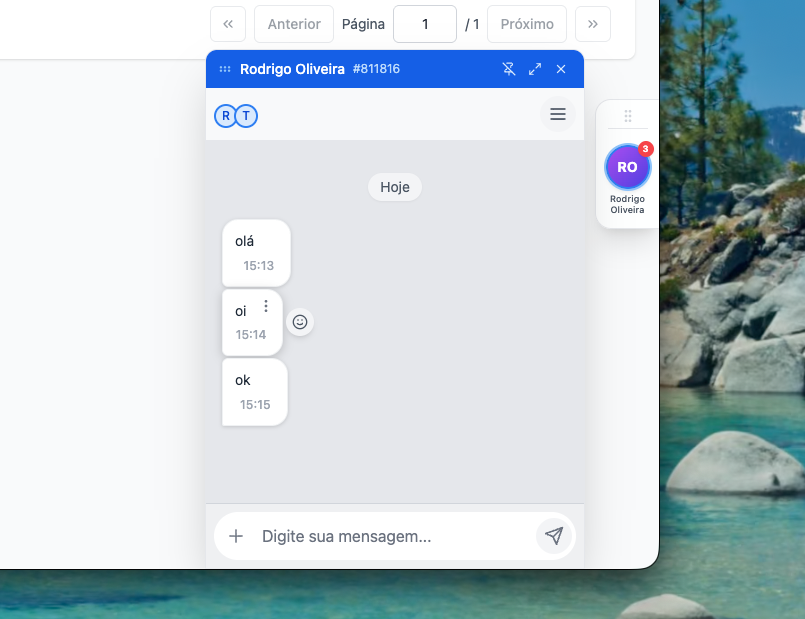
The chat works similarly to popular apps, supporting individual and group conversations between team members, real-time messaging, and in-system notifications. Users can also access conversation history securely and in an organized way, without interfering with customer support or CRM.
The expected result is better internal collaboration, centralized communication, and higher operational efficiency for teams already using Interflow.
How to use
How to use Internal Chat
Direct chat (1:1 with another agent)
- On the Chats page, click + in the top right of the header
- Select Internal Direct Chat
- In the list that opens, search and click the agent you want to talk to
- The conversation opens automatically in the floating widget (bottom right of the screen)
- If a conversation with that person already exists, the system opens the existing one — it does not create duplicates
The widget appears automatically for the other agent too, without them doing anything.
Internal group (multiple agents)
- Click + in the Chats header
- Select Create Group
- Choose type Internal Group
- Fill in the name, select the team and members
- Under Group Settings, enable Allow members to delete the group if you want everyone to have that permission
- Click Create Group
The group appears in the floating widget for all members automatically.
Delete a conversation
Direct chat: either participant can delete — open the chat, click the header ⋮ menu, and select Delete conversation.
Internal group: administrators can always delete. Regular members only if permission is enabled (set when creating). Same path: ⋮ menu → Delete group.
Deletion permanently removes all messages and files and the chat disappears from everyone’s widget in real time.
Notifications
When you receive a message in an internal chat you get a notification with:
- Direct chat:
Sender name - Internal Chat - Internal group:
Sender name · Group name
The sender never gets a notification for their own message.
Progresso
100%Trevisol & Silva Advocacia · 27 de março de 2026