Descrição
We need a system that sends users automatic notifications about scheduled appointments, for events at the office and at the customer's location. The goal is to ensure no one forgets to attend or prepare for their appointments.
How it works is simple: whenever an appointment is booked, the system sends a notification to the app and the web (PC) version exactly one hour before the event starts. Everyone involved has time to get ready.
With this feature, we expect fewer no-shows and delays, making support more organized and efficient for customers and staff.
How to use
Automatic reminders before appointments
Interflow now alerts the team 1 hour before each appointment — whether at the office, at the customer's home, or anywhere else. The alert arrives on mobile (app) and computer (web), so everyone has time to prepare and leave on time.
What happens in practice?
- When an appointment is booked on the schedule, the system schedules the reminder automatically.
- 1 hour before the time, those involved receive a notification with the customer name, service, and time.
- If the appointment is changed or canceled, the reminder is updated or removed on its own — no manual work needed.
Who receives the alert?
- The professional responsible for the session.
- Other staff you choose on the schedule (managers, assistants, etc.).
Important: this alert is for the team. Messages to the customer (WhatsApp, email) are still configured separately on the schedule Notifications tab.
How to enable (step by step)
- Open Schedule in the menu.
- Open the desired schedule and click Edit (or create a new schedule).
- Under Notified users, mark who besides the professional should receive alerts.
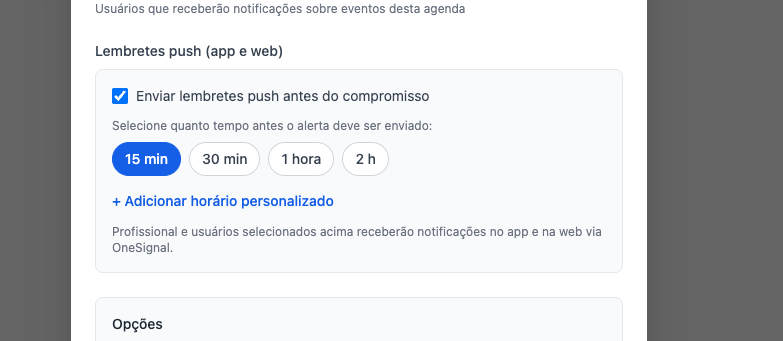
- In Push reminders (app and web), keep Send push reminders before the appointment checked.
- Confirm 1 hour is selected (enabled by default).
- Click Save.
Done. From then on, all new appointments on that schedule generate the reminder automatically.
Quick tips
- Want more advance notice? Also select 15 min, 30 min, or 2 h, or add a custom time.
- To turn off reminders for a schedule, uncheck the option and save.
- To receive on phone or browser, log in at least once and allow notifications when prompted.
Expected result
With automatic reminders, the team organizes in advance, reduces forgetfulness and delays, and support becomes more predictable — for those who provide service and those who schedule it.
Full documentation: Push reminders on Schedule
What's new in this version: Changelog v2026.6.11
Progresso
100%Trevisol & Silva Advocacia · 16 de junho de 2026