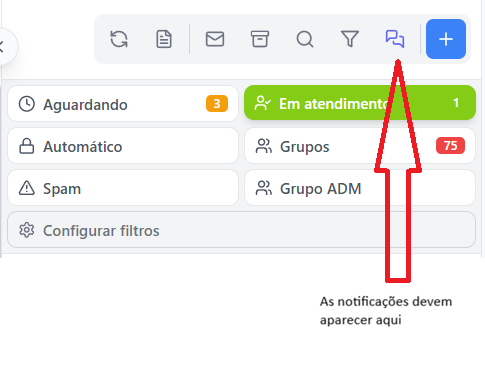
Descrição
Implement notifications to inform users when there are new messages in internal groups and internal chats on the platform. This is important to ensure that no internal announcement is missed and everyone stays up to date, improving efficiency of team communication.
When a new message is sent in any internal group or internal chat, involved participants should receive a notification immediately and clearly. Notifications can be delivered via the system (screen, bell icon, badge) or eventually by email/app, always respecting each collaborator's preferences.
The expected outcome is that users are promptly alerted about new internal interactions, making it easier to follow conversations, decisions, and team guidance in real time.
How to use
Internal communication — you no longer miss anything
The platform now notifies you immediately when a message arrives in internal direct chats or internal groups on your team.
What you receive
On the platform
- Red badge with the number of internal conversations with unread messages — visible on the Internal tab (mobile), the Internal Chats shortcut on the Conversations screen, and the list actions menu.
- List updated in real time, with a preview of the last message (text, media, or sender), without reloading the page.
- Per-conversation counter inside Internal Chats, so you know exactly where messages are pending.
On mobile or browser (push)
- When a new internal message arrives, conversation participants (except the sender) can receive a push notification, with the sender's name and a direct link to open the chat.
- Works for those using the app or with push enabled in the browser, per organization settings.
How it works in practice
- Someone sends a message in an internal group or direct internal chat.
- Other participants are notified right away (badge + push when applicable).
- When you open Internal Chats, the conversation appears at the top, with a preview of the last message.
- When you enter the conversation, messages are marked as read and the counter updates.
Why it matters
- Team announcements, decisions, and guidance do not stay hidden in conversations nobody saw.
- The team follows internal topics in real time, without manually checking each group.
- Internal communication gets the same level of attention as customer conversations — clear, visible, and easy to access.
Where to access: Internal Chats menu or the corresponding icon on the mobile bar and Conversations list.
Version: v2026.6.4 — details at docs.interflow.chat/changelog/2026/06/2026.6.4
Progresso
100%Inovaseg · 11 de junho de 2026