Descrição
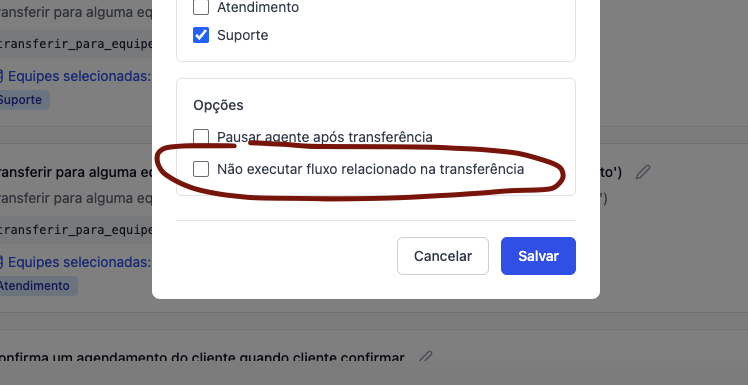
Add an option in the AI transfer tool so that, when moving a conversation from one team to another, the automated flow linked to the transfer is not executed. This is needed for cases in which the team only needs to reassign the conversation without triggering unwanted messages, tasks, or automatic updates.
The option should appear in the transfer window as a simple field the user can check to prevent the associated flow from running. When enabled, the system only reassigns the conversation to the new team/agent and keeps the current state without starting the automatic flow. When disabled, the current behavior stays the same and the flow runs normally.
With this, agents will have more control when reassigning conversations, avoiding automatic triggers that can confuse customers or generate unnecessary actions. Expected result: clean transfers when desired, fewer unwanted automated messages, and less rework for the team.
How to use
New feature: flow control on team transfer
What does it do?
It lets you configure whether the flow related to the team should run or not when the AI agent transfers a chat.
Where to find it
- Open AI agents
- Edit or create an agent
- Go to Tools
- Add or edit the "Transfer to team" action
- In the "Options" section, you will see:
- Pause agent after transfer
- Do not run the related flow on transfer (new)
How to use it
Option UNCHECKED (default):
- The transfer happens normally
- The flow configured on the team will run
- Current behavior is kept
Option CHECKED:
- The transfer happens normally
- The flow configured on the team will NOT run
- Useful when you only want to transfer the chat without triggering automations
When to use it
Check this option when:
- You only want to transfer the chat to another team
- You do not want the team's welcome flow to be triggered
- The AI agent is already managing the entire conversation
Leave it unchecked when:
- You want the destination team to run its default flow
- You need the team's welcome/instructions flow to run
Practical example:
Customer: "I want to talk to sales"
With the option unchecked: The chat is transferred → The sales flow runs (e.g. "Hello, I'm from the sales team...")
With the option checked: The chat is transferred → The sales flow does NOT run (the AI agent continues the conversation normally)
Progresso
100%Inovaseg · 31 de outubro de 2025