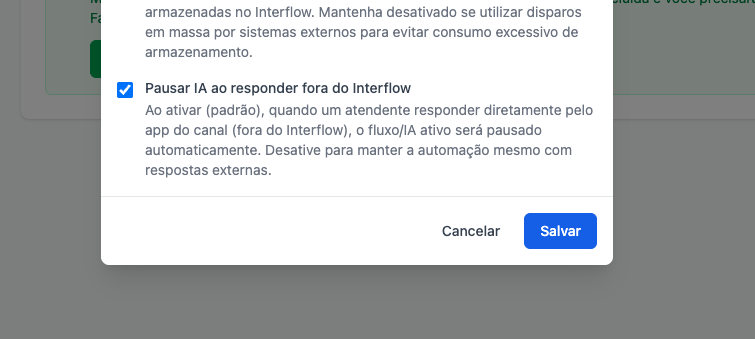
Descrição
Today, when an agent replies to the customer outside Interflow, the AI Agent is paused automatically. The request is to let the user choose whether to pause the AI in this scenario instead of it always being automatic. This adds flexibility for teams that prefer to keep automation on even with external interactions.
In practice, a setting will be added in the Interflow panel. The administrator can turn automatic AI pause on or off when replies outside the platform are detected. Each company can adjust this flow to its support strategy.
The expected result is more control for teams, so the AI keeps running according to business preference and unwanted interruptions in the automatic flow are reduced when someone replies manually outside the system.
How to use
Pause AI when replying outside Interflow
You can now choose, per channel, whether AI/automatic flow should pause when someone on the team replies directly in the channel app (WhatsApp, Instagram, or Facebook) without using Interflow.
Default: pause stays on, as before. If you want automation to stay active even with external replies, turn the option off.
Where to configure
- Go to Channels in the side menu
- Open the channel you want to adjust:
- WhatsApp (QR Code / WAHA)
- Official WhatsApp
- Facebook Messenger
- On the channel page, click Settings (gear icon)
- Find “Pause AI when replying outside Interflow”
- Turn on or off according to your team’s strategy
- Click Save
What each option does
| Option | Behavior |
|---|---|
| On (default) | If flow/AI is active and someone replies in the channel app, automation pauses automatically |
| Off | Replies made outside Interflow do not pause the AI — automatic flow continues |
Important notes
- The setting applies per channel — each instance can have a different rule
- Messages sent from Interflow itself never trigger this pause
- On Official WhatsApp, the option is on the official channel; phone replies are captured by the auxiliary channel but still respect this setting
- This is different from “Pause AI when handling” in organization settings, which only applies when the agent clicks Handle inside Interflow
When to turn it off?
Turn it off if your team often replies from the phone/native app but wants the bot/AI to stay active to keep automating support.
Keep it on if, when replying externally, you prefer automation to stop and support to become manual.
Progresso
100%Interflow · 15 de junho de 2026